— Quick answer

Revoke download access after a refund or chargeback

Refunds and chargebacks don't automatically cut off downloads in Alva Digital Downloads. Open the order, click Disable access, and existing download links stop working straight away.

Steps to revoke access

1. Open the refunded or disputed order

In the Alva Digital Downloads admin, click Orders. Search by Shopify order number or customer email, then open the order you refunded in Shopify or that received a chargeback notice.
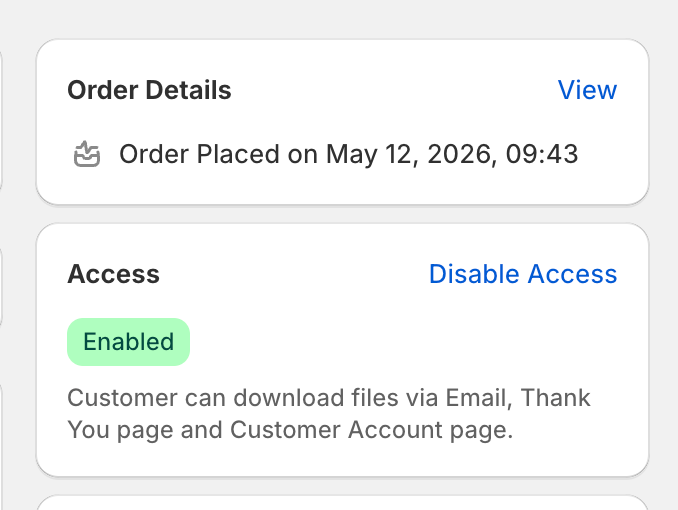
Screenshot needed

Alva admin order detail page. Highlight the Access card in the right-hand column with its current "Enabled" badge and the "Disable access" button. No real customer data visible.

The Access card on the order detail page.

2. Click Disable access

Find the Access card in the right column of the order page. Click Disable access. The status badge flips from Enabled to Disabled and any existing download URL the customer holds stops working immediately.

3. Confirm the link is dead

Click Copy link on any file row and paste it into a private window. The page returns an access-denied error instead of the file. Files, order history, and download counts stay intact, so you can click Enable access later if the dispute is reversed.
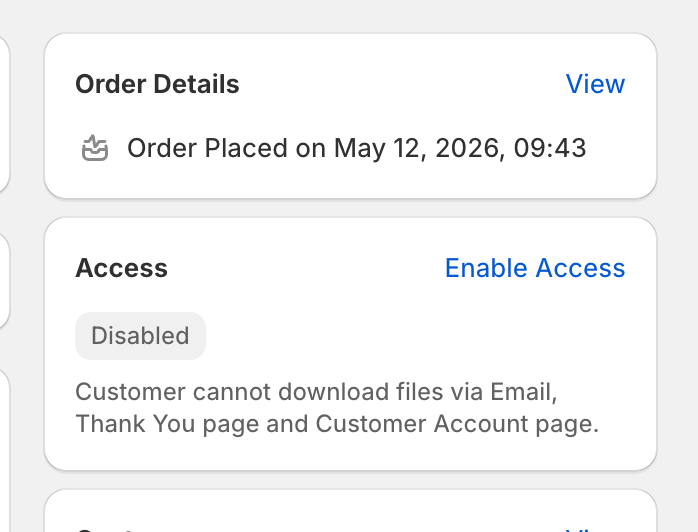
Screenshot needed

Same order page after clicking Disable access. Highlight the Access card showing the "Disabled" badge and the now-labelled "Enable access" button. Show the muted description text underneath.

The Access card after disabling, with the toggle button now reading "Enable access".

See also

Was this helpful?

Still stuck? Email us.

Last updated 2026-05-06