— Quick answer

Disable or re-enable access for a specific order

Open the order in the Alva Digital Downloads admin and click Disable access on the Access card to revoke downloads, or Enable access to restore them.

Steps to toggle order access

1. Open the order

In the Alva Digital Downloads admin, click Orders. Search by Shopify order number or customer email, then open the order detail page.

2. Find the Access card

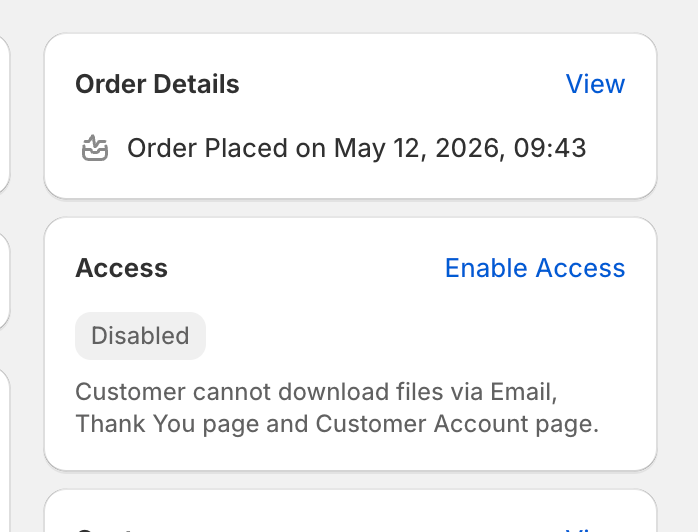
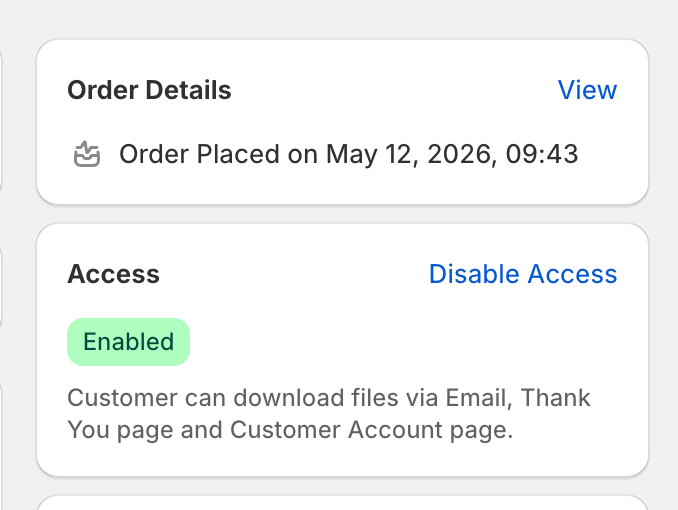
On the order detail page, locate the Access card. The status badge reads Enabled or Disabled and the description below states what that means for the customer.
Screenshot needed

Order detail page Access card in the Disabled state. Show the grey Disabled badge, the descriptive text, and the Enable access button in the top right of the card. No real customer data visible.

The Access card showing the Disabled state.

3. Click Disable access or Enable access

Click Disable access to revoke downloads for this order immediately. Click Enable access to restore them. The change applies to every file, pack, link, and license key on the order, and takes effect on the next download attempt.
Screenshot needed

Order detail page Access card in the Enabled state. Show the green Enabled badge, the descriptive text, and the Disable access button in the top right of the card. No real customer data visible.

The Access card showing the Enabled state.

See also

Was this helpful?

Still stuck? Email us.

Last updated 2026-05-06